
From a Parking App to a Hangang Visit App
Expanding a parking feature into a Hangang visit app around user intent and verifiable data
Parking was the starting point for Hangangjari. When deciding whether to visit the Han River, I also checked events, notices, and congestion.
At first, I thought solving the parking problem would be enough. Once I actually opened the app while preparing to go, other questions followed that remaining-space counts could not answer.
Even if I can take the car, I may change destinations if today’s event is too large. If there is a notice, another park may be the better choice. On days when I go by public transit, congestion and the locations of facilities matter before parking information.
- Are there events today?
- Is it crowded?
- Where are the restrooms and convenience stores?
- Are there announced controls or facility closures?
- If I go without a car, which station or stop should I use?
I also looked up this information across several apps and websites. At an unfamiliar park, it was harder to know which source to check first.
Search for “Hangang Park” and it can look like one place. Yeouido, Banpo, Ttukseom, Mangwon, and Jamsil differ in access, atmosphere, and crowd levels.
People also use the Han River in different ways.
When splitting the screens, I assumed someone driving would need remaining parking spaces and navigation first. I assumed someone arriving by public transit would need park congestion, events, facilities, and walking routes first. A picnic with children, a bike ride, an evening walk, and an event visit would likely produce slightly different questions before leaving and after arriving, too.
Hangangjari changed from a parking app into an app for choosing a Hangang park and finding what is needed after arrival. I reordered the first screens around the questions users actually asked.
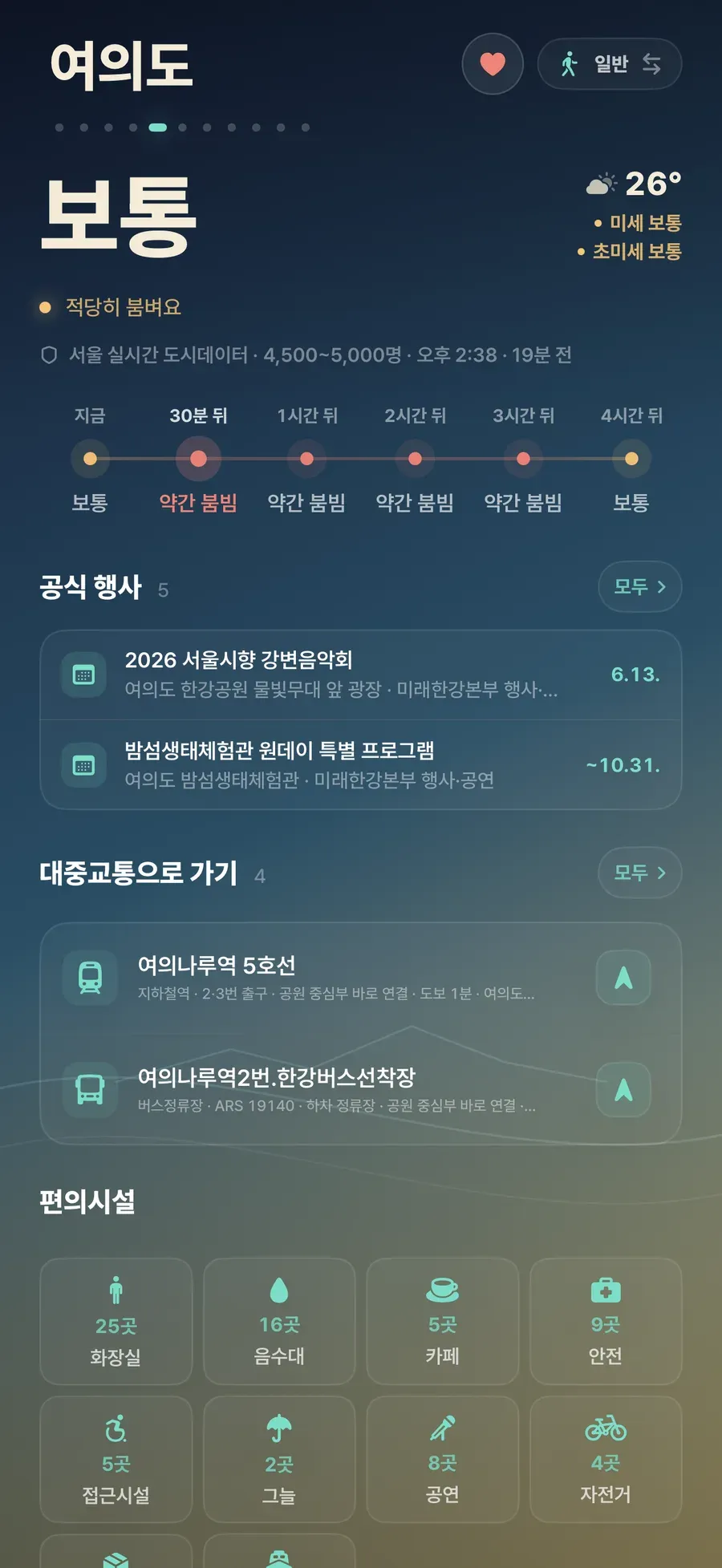
Inside the app, I split the experience into two screens based on the user’s question.
- Car screen: parking status, hourly parking changes, navigation, notifications
- General screen: park congestion, events, facilities, notices, public transit and walking directions, nearby facility search
Both screens deal with the same parks, but they start from different questions.
| Screen | First question to answer | Information placed first |
|---|---|---|
| Car screen | Can I take the car right now? | Parking status, recommended candidates, navigation, notifications |
| General screen | Is this park a good choice today, and what can I find nearby? | Congestion, events, facilities, notices, public transit |
Without separating the two screens, parking, events, facilities, and notices appeared with the same weight. After the split, I found that each screen helped me choose a destination or find a needed facility more quickly.
The app showed more, but the direction stayed narrow. It put only the information needed immediately before and after a visit up front, and moved the rest behind it.
At one point, I also considered a nationwide park outing app. For launch, I chose the Han River, where I regularly visited and could verify the data sources directly.
The Purpose of a Visit Before New Features
While widening the parking app into an outing app, I asked whether each new piece of information helped before a Han River visit or while being there.
Events can become a reason to visit, and notices and control information reduce wasted trips. Facility information reduces wandering on-site, and congestion and weather help choose which park is better today.
I postponed polished introductory copy and general tourist information for the first release. Information that helped people choose a park or facility came first.
This question also helped split the car and general screens. Parking leads the car screen, while park conditions and on-site facilities lead the general screen. Putting everything on one screen mixed both questions together.
As the amount of possible information grew, I asked what would help someone decide and find things faster.
Different Sources, Different Refresh Rates
Each official source had different quality and meaning. Some data updated often but had rough fields. Other data was stable but updated too slowly for a pre-visit decision. Some information appeared in official lists without enough explanation to show directly on screen.
Parking, events, notices, facilities, and real-time congestion all move at different speeds. They need different collection cycles, display methods, and failure messages.
For example, missing parking availability and missing event information mean different things. Missing parking availability shakes the decision to bring the car. Missing event information is closer to not finding an event that could become today’s purpose.
If both are displayed as the same “no information,” the screen becomes simpler, but the user leaves in a more uncertain state.
App Copy Worth Standing Behind
I was especially careful with the wording. “Accurate Hangang information” is easy to say, but it is a large promise for an independent app that gathers public data.
The app description said it helped people make decisions before and during a Hangang visit based on official public information.
The way an app is described also becomes a development boundary. If I do not decide what can be shown, which values are only references, and how stale values should be described, the screen and API keep drifting.
Hangangjari is an independent app, so its wording could not imply more certainty than the sources supported. Stale values carried an updated time showing how old the information was.
To match that description, the screen and API carried sources, updated times, and value limitations together.
Timestamps and Sources Beside the Numbers
A public-data app looks simple at first: fetch data and show it. The harder part comes after that.
I had to decide the range in which each piece of information could be trusted and shown.
Remaining parking spaces look like a number. Numbers feel definitive. But users may drive based on that number. Even if the app says 20 spaces remain, the situation may change before they arrive. A specific parking lot may update late, or an event or control may make operations different from usual.
The screen showed remaining spaces together with status, updated time, source, and hourly changes. Labels such as “available,” “normal,” “crowded,” and “full” helped users interpret the number.
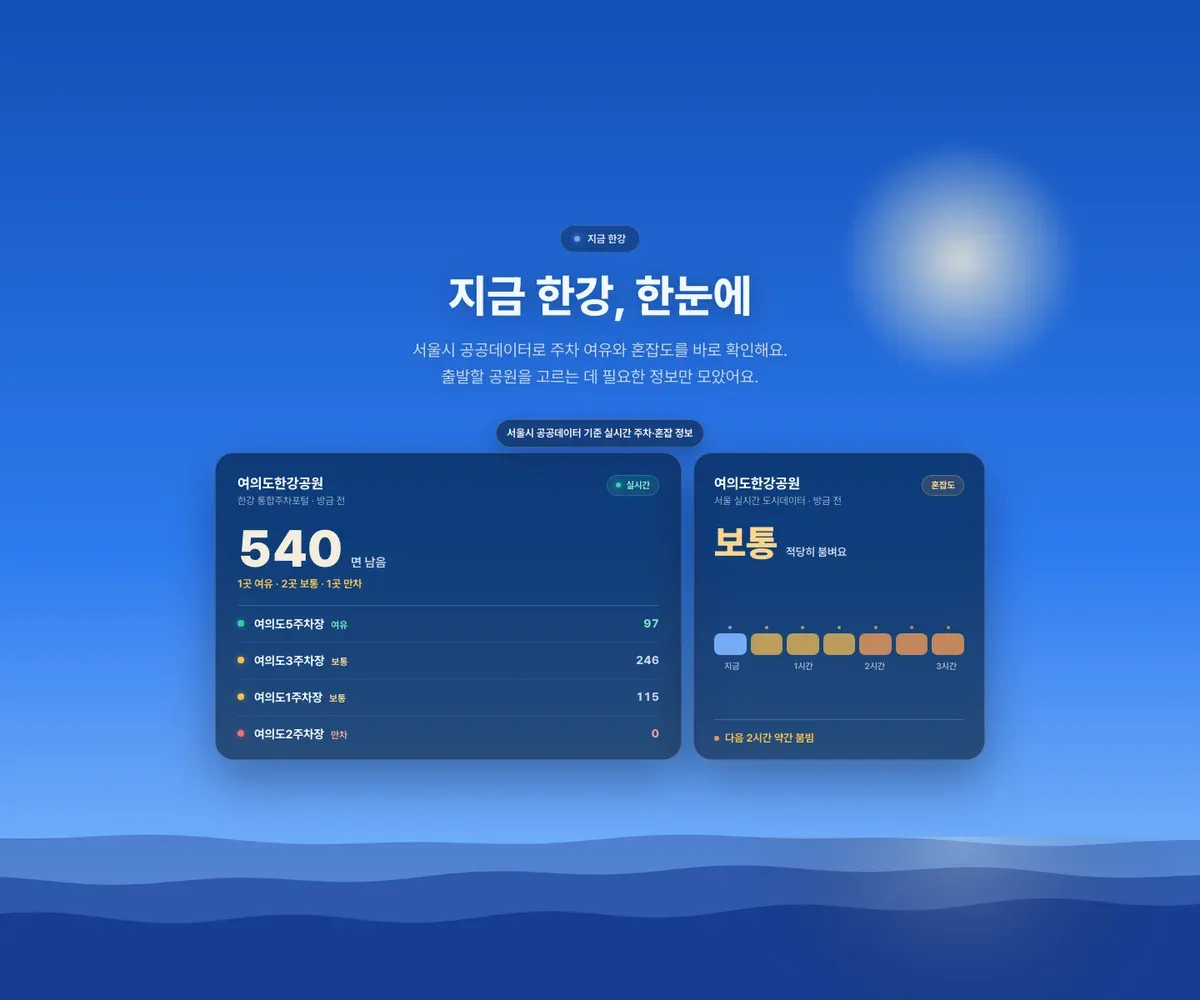
Events and facilities were similar. There were usable official sources such as event and performance information from the Future Hangang Headquarters, Hangang news, announcements, facility data, and Seoul real-time city data. But each source had a different use and update cycle. Some were event lists, some were operational notices, and some were closer to current congestion or weather.
So the server did not mix sources into one lump. It separated them by how the screen needed to use them.
- Parking: remaining spaces and status needed to decide whether to bring the car now
- Real-time context: park congestion, weather, road conditions
- Events/programs: official schedules that can become a reason to visit
- Notices: operational changes, controls, and facility closures that can cause wasted trips
- Facilities: restrooms, stores, parking lots, and access points people look for on-site
Hangangjari is an independent app that gathers public data and official information in a more readable form. The same rule for displaying sources and limits also applied to prediction, caching, localization, notifications, and incident response.
I split the screens around questions people ask before and during a Han River visit, then attached sources and updated times to the information the app could answer. Parking, events, notices, and facilities could then share one app while keeping their different uses and limits visible.
Comments
No comments yet. Be the first to leave one.
Pending review