
A Hangang Parking Widget After Buying a Car
Building a Hangang parking widget to check parking availability quickly before leaving

I published the iPhone app Hangangjari on the App Store.
It is a free app with no login, ads, or in-app purchases. I started it to reduce a small inconvenience I kept running into.
The first goal was to reduce one inconvenience I experienced when visiting Yeouido Hangang Park. I used to go almost entirely by public transit. I would get off the subway, walk to the park, buy something at a convenience store, and find a spot.
Back then, going to the Han River was simple. If the weather was fine and the timing worked, I just went. There was not much to check on the way. For me, the Han River was a familiar place where I arrived and spent time.
After buying a car, the number of things I had to check before going to the Han River suddenly grew.
After “Should we go to the Han River?” came another set of questions.
- Which parking lot should I enter?
- Are there spaces right now?
- If the entrance line is long, where should I reroute?
- What happens if the lot is already full when I arrive?
Before leaving, I often opened the integrated Hangang parking portal to check remaining spaces. Finding and opening that web page every time was more annoying than I expected. The worse moment was leaving without checking. When cars were lined up at the parking-lot entrance, turning around to another lot became tiring fast.
That was when a thought occurred to me.
I wish I could see this directly in an app or widget.
That idea became the starting point for Hangangjari. If I could quickly check remaining spaces right before going to the Han River, the hesitation before leaving home would shrink.
The first goal was to save ten seconds before departure.
At first, that was enough. I began with an app that let me glance at the phone before picking up the car key and answer, “Which parking lot should I choose today so I wander less?”
A First Version Built Around Parking
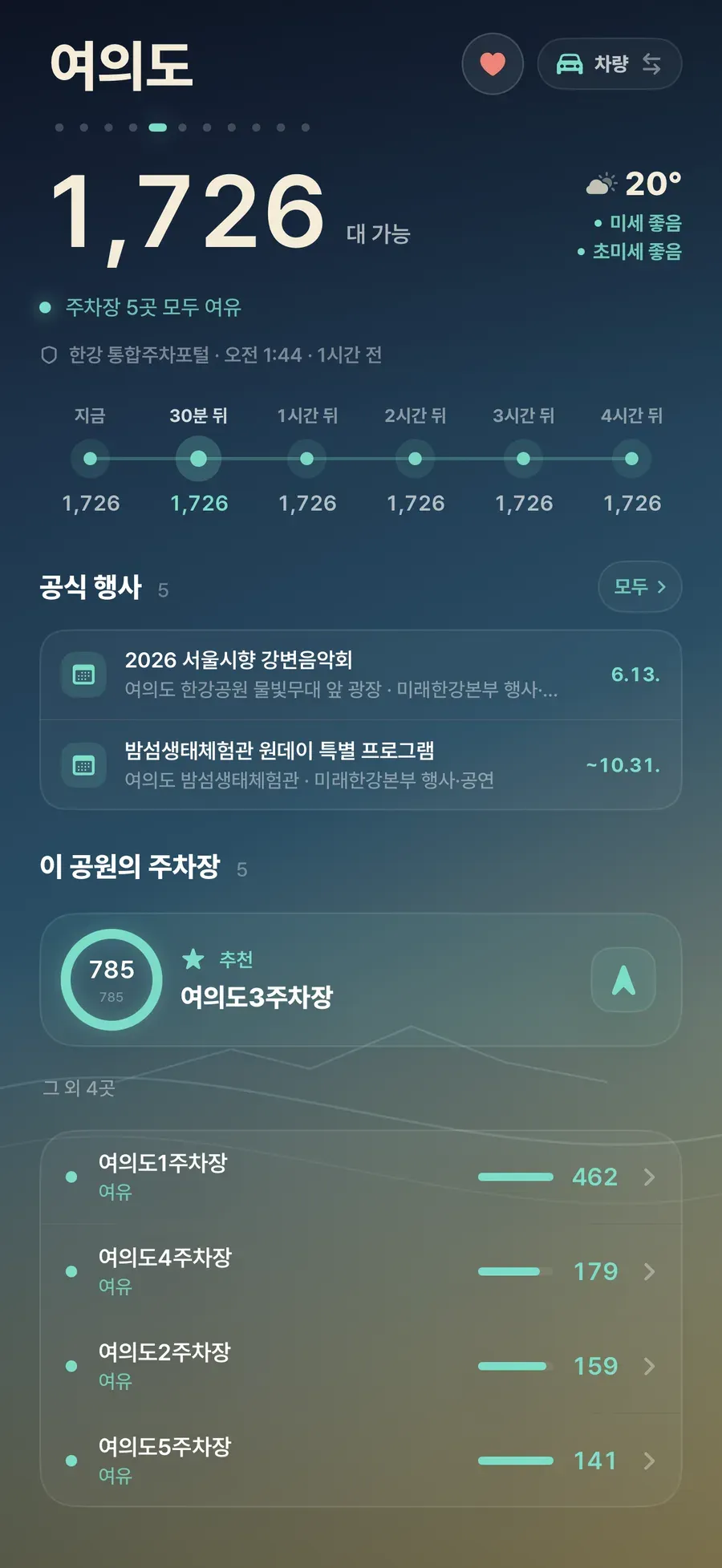
Looking back at the earliest notes, Hangangjari had a very narrow scope. Before going to Hangang Park, I wanted to check parking conditions quickly and, if needed, move straight into navigation. I especially wanted to solve the Yeouido Hangang Park case first: choose where to park with one widget glance before leaving.
There was one success criterion: opening the parking portal less often when going to the Han River.
The first build added remaining parking spaces, congestion status, parking-lot detail, favorites, navigation handoff, and widgets. The mid-May 2026 planning notes defined the scope of a Hangang-park-centered parking app.
Starting small turned out to be a good decision. It was a problem I actually had, and the usage scene was clear. I could also tell quickly whether the direction was wrong. If I still opened the web page before going to the Han River, the app had failed.
At this point, Hangangjari was still close to a “Hangang Park parking widget.” Using it myself soon exposed other information I checked before deciding to visit the Han River.
Four Questions for the First Version
The early version was meant to answer four questions.
| Question | What the screen should show |
|---|---|
| Can I take the car? | Remaining parking spaces and status |
| Which parking lot is better? | Recommended candidates and navigation handoff |
| Can I trust this information? | Updated time and status labels |
| Do I have to open the app every time? | Favorites and widgets |
This table helped later when cutting features. Even if a feature looked useful, if it did not answer one of these four questions, I postponed it for the first version.
Fixing the initial scope on choosing a parking lot before going to the Han River let me reach a state I could test through my own use.
Once the question narrowed, the first screen naturally became lighter. I thought first of someone checking the phone briefly right before leaving.
A Quick Choice Before Leaving
I used the scene of looking at my phone before leaving home on a weekend afternoon as the baseline. I quickly choose whether Yeouido Parking Lot 1 has space, whether I should go to Lot 2, or whether it is better to switch to Banpo or Mangwon.
If I am already in the elevator or sitting in the car, I do not have time to move through several app screens. What I need then is a short judgment: “Where should I go now to wander less?”
I removed park marketing copy, long explanations, decorative cards, and detailed information for every parking lot from the early screen.
Those things may matter to someone opening the app for the first time, but they got in the way when I used it immediately before leaving. The first screen focused on choosing where to go in that moment.
Parking Information Before the App Opens
Parking information can be too late if it appears only after opening the app. The decision about whether to go to the Han River, and whether to bring the car, usually happens before leaving home. That made the widget outside the app as important as the home screen inside it.
The early widget had one goal: show whether bringing the car looked practical without requiring the app to open.
Thinking about the widget first simplified the data and the screen. The widget did not need every parking lot. Recommended lots, updated time, and status labels mattered more because they fed directly into the decision.
The app screen came next. The natural flow was to get the rough answer from the widget, then open the app only when I needed a closer comparison.
A Small Problem with a Finish Line
I could test the goal, “make me open fewer web pages when I go to the Han River,” through my own use. Because adding features also expanded the screen, data, and explanation, I did not widen the scope for the first version.
Because the problem was small, deciding what to build was easier. When something was unclear, I returned to the real moment of use. Does this help within ten seconds before going to the Han River? Is it clear in a widget? Does it avoid recommending a parking lot that is nearly full? Features that did not meet that standard waited.
The first version of Hangangjari moved my repeated parking check into an app and widget.
What the First Version Left Out
I intentionally postponed signup, server-synced favorites, community features, reviews, user-submitted parking reports, payments, ads, and complex personalization because they did not help solve the first problem.
I especially did not add login. A frequently visited park or parking lot could be stored on the device, and account creation was too heavy for a pre-departure checking tool. An app meant to save ten seconds before going to the Han River would lose its direction if the first launch asked for an email address.
I treated favorites simply as well. They did not need server sync. It was enough to quickly reopen the parks I often checked on this device. Small decisions like that shape the character of an app. The goal was an app that opens quickly and closes quickly at the moment it is needed.
Decision Clues on the First Screen
The same rule shaped the home screen: help someone decide whether it was worth going right now.
Parking-lot names, remaining spaces, status, and updated time came first, with the introductory copy moved below. A person seeing the screen should be able to decide, “This one looks better,” or “Now seems uncertain.” The screen showed status and the next action first.
Fixing one problem from the parking-lot entrance determined what to keep in the widget and on the first screen. Even after adding the general mode, the direction stayed the same: help people find the facilities and access points they need inside the Han River area.
Links
Comments
No comments yet. Be the first to leave one.
Pending review