
An iOS Experience Before the App Opens
Designing widgets, location permission, and empty states as one flow across app launches
Users encountered Hangangjari through widgets, notifications, and deep links as well as its app screens.
At first, I thought one app screen and one widget would be enough. Once I tried to use it myself, the work on the iOS side grew quickly.
I assumed that users right before departure would not calmly explore an app. I was often about to leave home, standing by the elevator, or already sitting in the car myself. If the app, widget, notification, and map-app handoff broke apart in that short moment, I figured the user would go back to the old way.
The app carried park lists and parking information. The widget carried the current status without opening the app. Favorites stayed on the device, and notification settings synced with the server. Navigation handed off to the map app the user already used, such as Naver Map, KakaoMap, TMAP, Apple Maps, or Google Maps.
I built it with SwiftUI, and internally separated state, API calls, local cache, and widget snapshots so they would not blur together. SwiftData stored park and parking status plus updated times, and the app and WidgetKit extension read the same values through an App Group.
When a user entered the app from a widget or navigation flow, it continued to the park and screen they had been viewing.
For car decisions and widgets, I put checking before departure first. Widgets became surfaces viewed immediately outside the app, showing a frequent park without requiring the app to open. I kept revising what to keep and what to discard in small, medium, and large widgets.
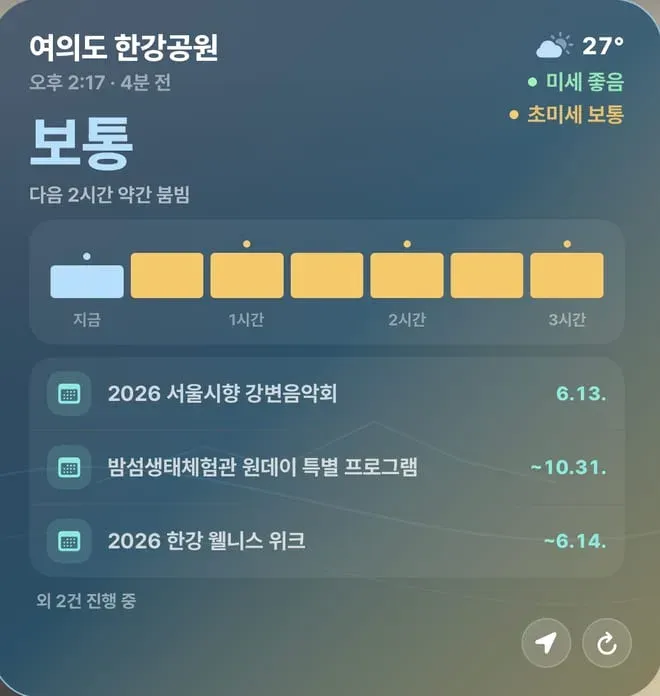
The general widget carried information that helps answer, “Is this park a good choice today?”, such as congestion, weather, and events.
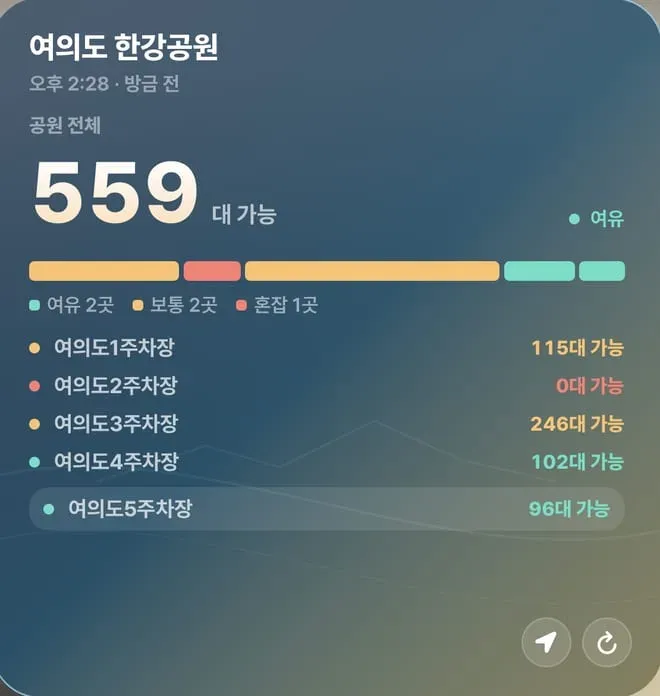
The car widget put recommended parking lots and remaining spaces at the top.
Widgets, notifications, deep links, cache, settings, permissions, and external map apps had to carry the same park state. On iOS, each touchpoint read only the information it needed.
I split the iOS surfaces according to where users needed an answer at each moment.
| Touchpoint | Job | Risk to watch |
|---|---|---|
| App | Compare, check details, search facilities, change settings | Do not blur the first-screen decision |
| Widget | Quick check before leaving | Do not make stale values look current |
| Notification | Changes in user-defined conditions | Do not alert on every small change |
| Deep link | Continue to the park and screen being viewed | Do not send the user back to the first screen |
| External map app | Start actual movement | Link near the parking lot or access point, not only the whole park |
This division assigned display to SwiftUI screens, state storage to SwiftData, value handoff between the app and widget to App Group, and widget refresh plus screen linking to WidgetKit and deep links.
Information Removed from the Widget
The car widget kept only the values needed for “which parking lot is better right now?” The general widget kept only the values needed for “is this park okay today?”
In the app, a user can scroll, tap, and enter detail screens. A widget does not have that time. The user glances once and either stops or leaves.
This difference affected data storage as well. Even if the app and widget use the same source data, the widget needed its own snapshot. I used an App Group to pass values between the app and WidgetKit extension so the app’s last observed status, updated time, selected park, and widget type would read together reliably.
Deep links opened a park from a widget directly into that park and that screen instead of a generic first screen. The navigation button also opened directly into the user’s preferred map app.
Location Permission at the Moment of Need
I also did not want to ask for location permission at the start. Hangangjari should be usable without knowing the user’s location. If users can manually choose parks and favorites, sorting nearby parks is a convenience, not an entry requirement.
Location remained an optional feature for finding nearby parks and parking lots. Users could still choose a park manually after denying permission, and granted coordinates stayed on the device instead of going to the server.
The permission prompt appeared when the user asked for nearby parks. At that point, the app explained what sorting by current location would change.
A Reason for Every Missing Value
I spent much of the iOS work refining failure screens. The app needed distinct states for data not loaded yet, network failure, stale last values, and information that did not exist for a specific park.
I wanted to finish the success screens first and deal with these cases later. But public-data apps encounter empty states often. Each source updates at a different speed, and some information exists only for some parks. If an empty screen has no reason, users feel that the app is broken.
So neither the app nor the widget treated “no value” as one state. Loading, failed fetches, unavailable information for that park, and stale last-success values each got different guidance. Users use those differences to decide whether to wait, look at another park, or leave anyway.
Separate Roles for App, Widget, and Notification
Many values make a small widget hard to read, while removing too many omits information needed before departure. The general widget kept values for “Is this park okay today?”, and the car widget kept values for “Can I take the car right now?”
Without this separation, the first app screen accumulated every piece of information, the widget became hard to read, and notifications fired on small changes. Assigning each touchpoint one job kept those failure modes visible during design.
Device Storage Shared by App and Widget
SwiftData and App Group stored network responses together with the selected park, favorites, and updated time shared by the app and widget.
The app remembered the user’s last selected park, favorites, viewed screen, and last updated time. The widget read that information safely even when the app was closed. If the network briefly failed, showing the last verified value and its time was better than showing an entirely empty screen.
From a Widget Park to the Same Park in the App
If opening the app from a widget starts again from the park list, the context breaks. The user was already looking at a specific park in the widget. The app needs to receive that park and screen.
External map apps are the same. When a user sees a parking lot and taps directions, it should move directly into the map app they usually use. Asking again or sending only the whole park address makes them wander again near the parking-lot entrance.
So the deep link opened directly into the same park and screen the widget had shown.
The iOS app focused on carrying the selected park and its state across app boundaries. Widgets, notifications, and deep links each received that state and continued the same checking process.
Comments
No comments yet. Be the first to leave one.
Pending review