
What Hangangjari Kept and Removed from Its Widgets
The criteria for keeping glanceable information in Hangangjari widgets and moving details to the app
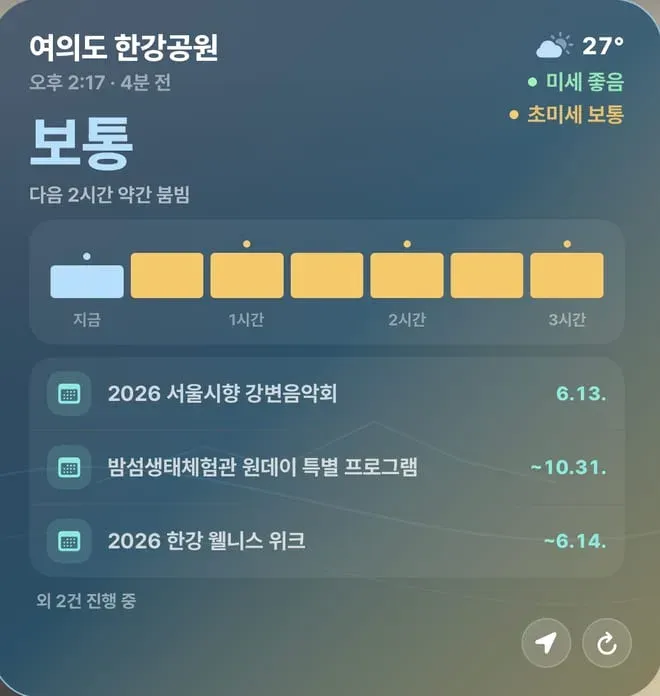
Hangangjari included widgets in its early plans. Before building one, I saw it as a minor surface where users would pick a favorite park and check a short summary from the home screen.
Using it myself proved otherwise.
Use had already begun before the app opened. A user sees a number while passing the home screen, sees a state on the lock screen, and checks again before picking up the car key. If the widget is ambiguous at that moment, the user is more likely to look elsewhere than open the app.
That moment does not need much information.
Is this park okay today? Can I take the car? Can the parking lot handle it right now? Are there event or congestion signals? Is the information stale?
The app shows details, while the widget keeps only values needed before departure. I treated it as a separate surface checked first outside the app.
A Widget Is Not the Latest Screen
When I started taking widgets seriously, the first thing I had to accept was that a widget is not always real time. iOS widgets refresh within system policy. They are not screens the app can redraw whenever it wants.
The widget shows the last confirmed snapshot and labels stale values with their updated time and state. Users who want more detail continue into the same park and mode in the app.
The UI copy uses “real time” sparingly and displays when each value was confirmed.
Only What Fits at a Glance
I removed information that did not help answer each widget’s question.
The general mode widget kept only information that answers “Is this park worth going to today?”, such as congestion, weather, fine dust, and event signals. The parking widget kept only information close to “Can I bring the car?”, such as recommended parking lot, remaining spaces, status, and updated time.
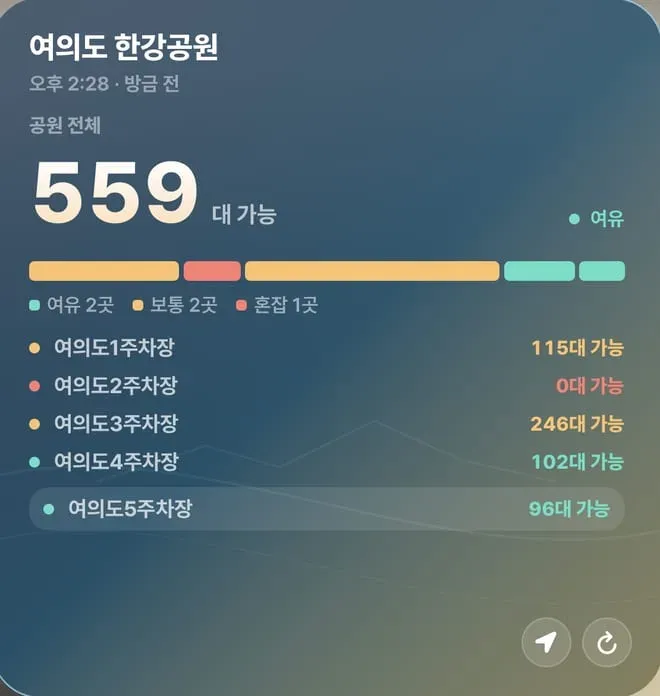
So I first defined the widget’s questions.
- General mode widget: Is this Hangang park worth visiting today?
- Car mode widget: Can I take the car right now?
Once these questions were fixed, the screen changed. Large numbers, short status, updated time, and minimal supporting signals remained. Details such as nearby facilities or route exploration were not placed in the widget; when users wanted more, the widget opened directly into the relevant park and mode.
The criteria for a good widget differed from the app screen.
| Criterion | App screen | Widget |
|---|---|---|
| Amount of information | Broad enough for comparison and detail. | Only what is needed in a single glance. |
| Freshness expression | Can show source and state by section in detail. | Shows updated time and stale state briefly. |
| Action | Leads to detail exploration, directions, and settings. | Leads into the app or is closed after a glance. |
| Good result | The user finds the needed information. | The user decides faster without opening the app. |
I evaluated whether users could finish a pre-departure decision. If someone glanced once and moved, the intended use was complete without opening the app.
Information Removed from the Small Screen
There were many things I wanted to add to the widget but removed: park descriptions, long notices, facility lists, multiple events, and detailed forecast charts. They matter in the app, but they slow decisions in a widget.
In the parking widget especially, I struggled between showing the most important candidate and showing every candidate fairly. Listing every parking lot in tiny text increases the amount of information.
Users right before departure want to know which lot to go to. The widget put the recommended candidate and status first, then moved detailed comparison into the app.
The general mode widget was similar. Weather, congestion, events, fine dust, and notices all look important. But if they all have equal weight on one small surface, nothing remains in memory. Facility lists that are useful on-site belong in the app screen. The widget should keep only the values that answer whether this park is okay today.
How the Widget Marks Stale Numbers
Because users do not read widgets for long, a stale value shown prominently can be mistaken for the current state. As decided earlier, the widget kept its updated time and stale-state labels.
This decision affected implementation. The app and widget read the same data differently. The app is a place to scroll, compare, and enter detail screens. The widget is a one-glance surface based on the last snapshot.
So the app stores a separate widget snapshot through an App Group, and when a user enters from the widget, it connects naturally to the selected park and mode.
Splitting the Widget’s Role from the App’s
Putting the widget at the center made the app’s role clearer.
The widget handles quick checks, while the app handles comparison and detail. Notifications report changes in conditions the user chose, and directions begin the trip. With this separation, the widget does not try to finish everything, and the app does not push every piece of information onto the first screen.
An Experience That Can End in the Widget
If someone can look only at the widget and decide “Let’s go to Banpo instead of Yeouido” or “Let’s leave the car today,” the intended use ends without opening the app.
Because pre-departure checks were frequent, Hangangjari treated the widget as a primary product surface. The home or lock screen shows updated time and state, and detailed comparison opens only when needed in the same park’s app screen.
Comments
No comments yet. Be the first to leave one.
Pending review