
Why Public Data Needs Sources and Update Times
Showing a public-data value with its source, observation time, and reason for missing information
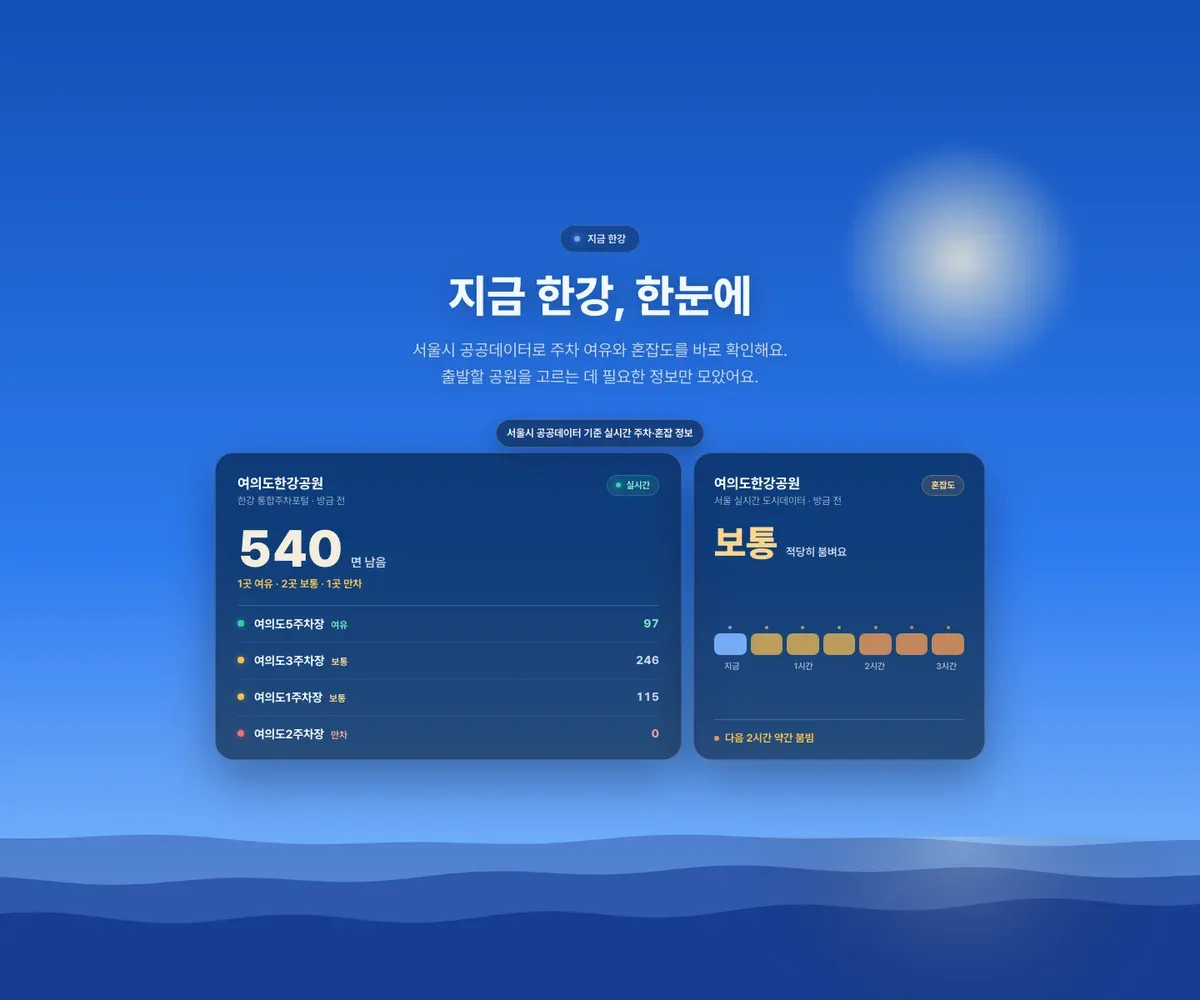
In an app that uses public data, saying “accurate information” is not enough. Especially in an app like Hangangjari, which helps people decide whether to move and stay, one number can lead directly to action.
If remaining parking spaces are shown as 20, users feel they can bring the car. If congestion looks low, they think it is okay to go now. If an event appears today, they may change destinations.
The number, status label, and updated time on screen all feed into decisions such as “I can go” or “I should avoid it today.”
The problem is that public data does not always arrive with the same speed or meaning.
Some values were just updated. Some were slightly old after the last successful collection. Some came from a live source but had no item for that park. Some came from a failing source and were hard to trust at the moment.
If all of these differences appear as “no information,” users cannot tell whether to wait or look elsewhere. If stale values look current, they can misread the on-site situation.
Hangangjari showed three things with each number.
- Updated time.
- Source.
- An admission that the app does not know.
Observation Time Beside the Number
Numbers are strong on a screen. A phrase like “20 spaces available” reads like a conclusion even without explanation. But parking lots keep changing while users are checking. Events, controls, weather, and time of day can also make the situation differ from usual.
Each number carried its observation time and last successful collection time, with a separate state for stale values.
Status labels such as “available,” “normal,” “crowded,” and “full” help users interpret remaining spaces. The screen displayed the label and count together.
I also decided not to hide sources. Hangangjari receives data with different purposes: parking, real-time context, events, facilities, and notices. Each has a different role and update speed. If event lists, real-time congestion, and facility state are blended as one kind of information, the screen may look simpler, but users cannot know how much to trust each piece.
Different Reasons for Missing Information
If null, empty array, timeout, and 404 all appear as the same empty screen, users cannot distinguish the cause. The action available to them also differs by cause.
If a park has no parking lot, the user should look at public transit or nearby lots. If the park has parking lots but no real-time value, only total capacity and location are useful. If a source temporarily failed, the user can check again later; if the last successful value is old, the user should account for on-site changes.
The screen distinguished “Collection is currently delayed” from “This park does not provide real-time parking information.” Each message indicated whether to check again or look at other information.
| What the screen should say | What the user can do |
|---|---|
| The value was just updated | Treat the current value as primary. |
| The last value is slightly old | Account for possible on-site changes. |
| The source temporarily failed | Check again later or look at other information. |
| This park has no such information | Look at transit, facilities, notices, or other information instead. |
| The source is not connected yet | Do not hide that the app does not know. |
Internal States as Screen Copy
This distinction entered the API response and screen guidance. Internally, sections have states such as fresh, partial, stale, and unavailable, plus updated time, last successful time, and source status.
I do not show internal state names directly to users. stale becomes wording such as “based on the last check” or “updates are delayed.” The internal names let the app, widget, and notifications process the same value with the same meaning.
The screen displays when and where a value came from and the current collection state. Hangangjari is not an app run by the Seoul city government or the Hangang River Park management office; it is an app I built from public information and data I organize directly.
Update Time and Source, Kept After Using It Myself
At first, I worried that showing updated time and source would make the screen messy. In use, those cues distinguished why a value was absent and when to check again.
Was this from a few minutes ago? Which source is it based on? Is it stale? Is the value absent, or did fetching fail?
The states separated by the backend and parser kept the same meaning in screen guidance, status labels, widget display, and notification rules.
More Conservative Notification Rules
Notifications are more sensitive than screens because they can prompt action without the surrounding context. I therefore applied stricter freshness checks to notification candidates than to values shown inside the app.
A threshold crossing alone did not create a notification. The server also checked when that value was confirmed, whether recent collection was healthy, and whether a similar notification had already been sent.
Each value carries its source, confirmation time, and current collection state. Notification candidates are created only after freshness, recent collection health, and duplicate-delivery checks pass. Screens and notifications use the same state information to show the range in which a value can be used.
Comments
No comments yet. Be the first to leave one.
Pending review