
From a Home Server to Production
Turning a home server into production with deployment records, health checks, and recovery procedures
The Hangangjari server was split into a FastAPI backend, workers, PostgreSQL/PostGIS, and Redis. Now that setup had to keep running outside my laptop.
From that point, the standard changed. “The server starts locally” was not enough. Data collection had to run while I slept. Deployments had to follow the same order every time. When something broke, I needed to know where to look first.
An API called by an App Store app had to keep running while I was away. When stale values or empty screens appeared, I also needed a way to inspect the server and collection jobs remotely.
The Home Server as Production
I ran the Hangangjari backend on a mini PC at home and configured deployment, monitoring, incident checks, backup, and recovery myself.
At first, the setup was close to Docker Compose. I ran Postgres, Redis, API, and workers in the local development environment and deployed something similar to the mini PC.
Serving external users meant deciding the following.
- When should migrations run?
- How should API and workers be deployed separately?
- How should Postgres and Redis be managed?
- What should be checked after deployment?
- If the API dies from outside, how do I distinguish a Cloudflare Tunnel issue, a K3s issue, and an app issue?
- Where do logs and metrics live?
- How do I roll back a bad deployment?
As these questions accumulated, Cloudflare Tunnel, K3s, ArgoCD, local CI, and a deployment-state repository entered the system.
External requests pass through Cloudflare edge and Tunnel into the K3s ingress on the mini PC. I did not expose the origin server directly; the tunnel maintains the connection. I also kept the user request path separate from the operator maintenance path.
CI writes an image tag that passed lint, test, and build into the deployment-state repository. ArgoCD then reconciles the K3s cluster to that tag. I added Prometheus and Grafana for metrics, and organized log pipelines plus backup and recovery routines.
The app did not end with one binary uploaded to the App Store. The API, data collection, cache, notifications, deployment path, operational configuration, health checks, logs, metrics, and backups were all part of the product.
Operations Beyond Power State
A mini PC lowered cost while increasing the number of decisions I owned. I had to choose how to detect a full disk, verify services after reboot, store database backups, and roll back a bad deployment.
So I did not use “the process is running” as the operational standard. Even when I was away, I needed to be able to check:
- Is the API alive?
- Are workers running at the scheduled times?
- Is the last successful collection too old?
- Are DB and Redis healthy?
- Is the deployed image actually reflected?
- Is there a defined order for checking layers when something goes wrong?
Without logs and metrics, I first had to guess which component had failed. I made the API response, each worker’s last run, the database, Redis, and the deployed image independently checkable.
Automation That Reduced Mistakes
Manually building images, entering the server, and restarting services made it possible to skip a deployment step. Before launch, copy, API responses, and worker intervals changed often enough to repeat this path many times.
I put lint, test, build, image build, deployment-state update, and ArgoCD reconciliation into CI. Small changes then followed the same sequence and reduced omitted steps.
The resulting path repeated a successful deployment in the same order and gave me a fixed sequence for incident checks.
Once I could redeploy the server and verify its state, I moved into launch preparation.
App Store Release and a Smaller Promise
The first version began with parking in Yeouido, then added events, facilities, notices, and directions. After separating the API from the workers and defining deployment and observability, I prepared translations, screenshots, the brand site, and App Store metadata.
Even after the app features were mostly complete, it was not immediately ready to launch.
App Store Connect asks for more than expected: app name, subtitle, description, keywords, privacy policy, support page, age rating, App Privacy, and review notes.
Screenshots, TestFlight builds, real-device validation, and localized metadata were also required.
During this process, Hangangjari’s wording changed a lot.
Early on, parking was much further forward. In public metadata, I summarized it as a way to see Hangang Park outing information at a glance. The app description no longer led with only parking; it expanded to cover all eleven Hangang parks. I added parking availability, congestion flow, and event and facility information.
I also made a brand site. At first, I thought a support page and privacy policy would be enough. But when someone who does not know the app arrives, the page needs to explain quickly what the app does.
So I built a multilingual brand site at hangangjari.app and made it show app screens, widgets, forecasts, notifications, directions, and official data sources.
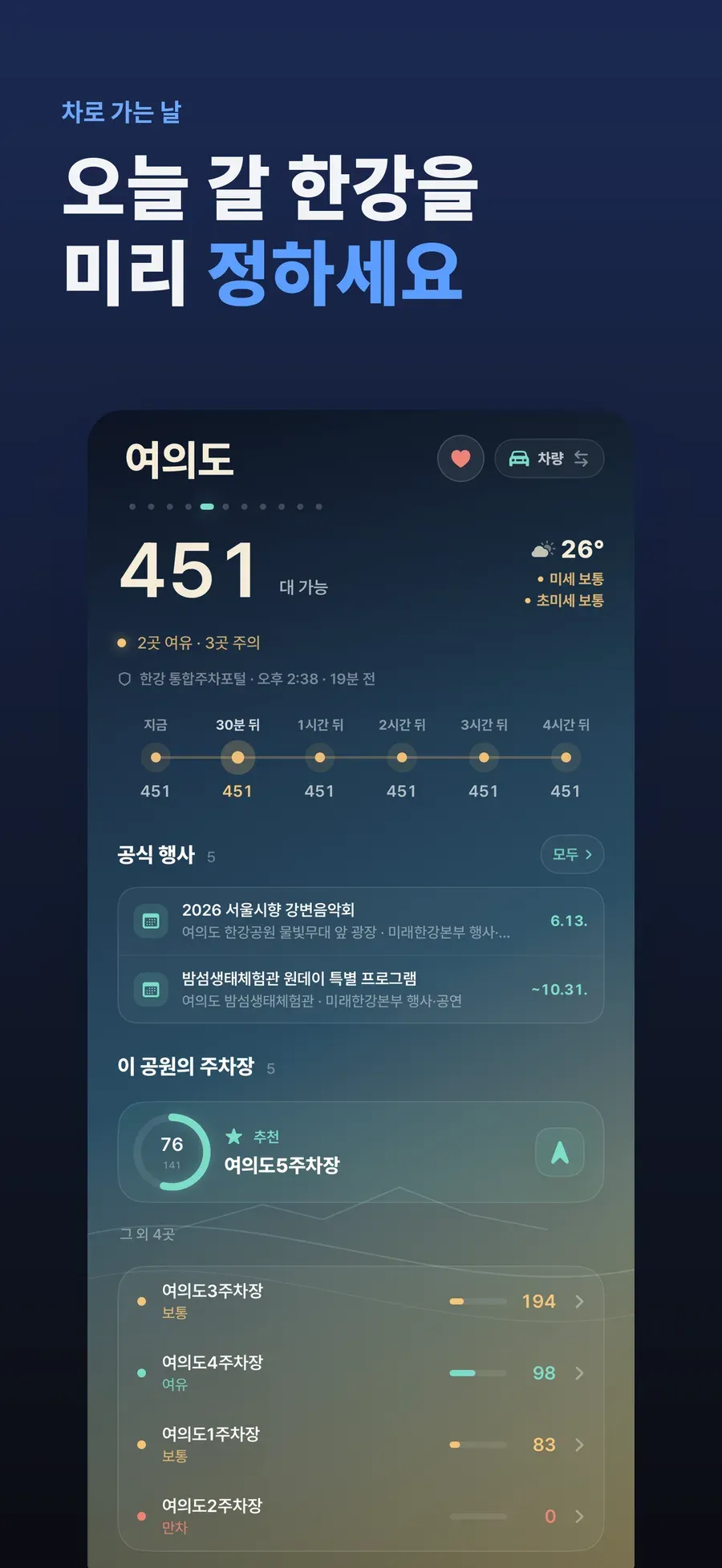
The last few days before release focused on verification and cleanup. I made localized screenshots, uploaded them to App Store Connect, and created TestFlight candidates while incrementing build numbers.
After choosing the final candidate, I aligned the release tag and public metadata. I also checked again that the App Store name, description, and privacy disclosures did not drift from the real functionality.
The name, description, screenshots, and brand site are information users meet before opening the app.
Copy Removed Before Release
Near the end, I spent more time reducing and aligning explanations than adding features. A long App Store description became less clear. Screenshot copy had to be short. The privacy policy and support page had to be accurate without exaggeration. I also could not hide that the app was not official.
As a developer, it is easy to gloss over these things because I already know the app. But before installing, users first see the name, icon, screenshots, description, and privacy disclosure.
I used the server’s verified behavior as the same scope for the App Store description, privacy explanation, and support pages.
The Product Constraints I Kept Through Release
Hangangjari is a free app. It can be used without login, and favorites are stored on the device. Location is used on-device only when sorting nearby parks and parking lots. There are anonymous usage events for product quality checks, but the app was built from the beginning to avoid unnecessary accounts and personal data.
I did not add a business model. I focused on fixing an inconvenience I experienced and publishing it for people who needed the same information.
The Han River was familiar to me, but bringing a car or choosing a new park still meant checking several sites. Parking, congestion, and facility locations are also useful before leaving with children or visiting a Hangang park for the first time.
- Which park should I go to?
- Can I take the car?
- Is it crowded right now?
- Are there events today?
- Where are the restrooms and convenience facilities?
- Which map app should directions open in?
Hangangjari gathers the public and curated information needed for these questions in one place. At least one of my habits changed: instead of opening the parking web page every time, I began checking the app and widget.
After the App Store release, I also had to verify that these features kept working on other people’s phones. That left the mini PC’s deployment state, data collection times, backup and recovery procedures, and App Store copy to manage together.
Links
Comments
No comments yet. Be the first to leave one.
Pending review